Planning for higher studies in India or abroad is an incredible milestone for any student. However, the rapidly rising cost of academic tuition, hostel accommodation, library fees, and study textbooks can often place a heavy financial burden on middle-class families.
To ensure that financial constraints never stop a meritorious student from accessing world-class learning, the Government of India launched a unified digital initiative. Managed under the guidance of the Ministry of Finance and the Ministry of Education, this digital gateway completely revolutionizes how you secure student funding. Navigating the vidyalakshmi portal education loan application step by step procedure allows you to apply to multiple premier banks simultaneously using a single online form.
In this clear and practical guide, we will break down the entire online application cycle, explain the structure of the common government form, list the essential documents, and show you how to monitor your dashboard easily until your funds are successfully disbursed.
Direct Answer Snippets for Quick Understanding
What is the step-by-step process to apply on Vidya Lakshmi?
To execute the vidyalakshmi portal education loan application step by step process, you must first register on the official portal and create your profile. Next, log in and accurately fill out the centralized Common Education Loan Application Form (CELAF). Finally, search for eligible bank schemes, shortlist your preferred lenders, and submit your digital form.
What is the CELAF form inside the Vidya Lakshmi portal?
The CELAF stands for Common Education Loan Application Form. It is a standardized, single application form designed by the Indian Banks' Association (IBA). Instead of filling out separate paperwork for different public or private sector banks, you complete the CELAF just once, and the portal securely shares it with your chosen lenders.
To how many banks can I apply using Vidya Lakshmi?
The automated portal structure allows a student to select and apply to a maximum of three separate banks and three distinct lending schemes at the same time using your single CELAF profile. Each selected bank will evaluate your academic and financial credentials independently and update your real-time processing status directly on your student dashboard.
Step 1: Account Creation and Portal Registration
The initial stage of your educational funding journey begins by creating a unique user profile on the central government platform.
Open your internet browser and visit the official online link at vidyalakshmi.co.in. Locate the prominent 'Register' tab positioned on the top menu bar of the homepage.
The portal will present a basic registration form where you must input your full legal name, a active email address, and a valid Indian mobile number. Create a strong, private password, enter the security captcha code, and click submit. The system will instantly send a secure account activation link to your registered email inbox. You must click this link within the specified timeline to verify your identity and activate your digital student dashboard.
Step 2: Logging In and Accessing the CELAF Framework
Once your account is successfully verified, you can step into the primary application dashboard to start inputting your academic data.
Return to the homepage, click on the 'Login' option, and select 'Student Login' from the dropdown window. Input your registered email address and password to enter your account.
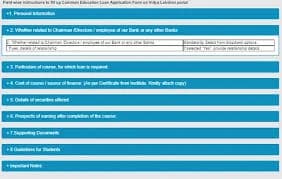
Once inside, you will see a clean dashboard layout. Click on the 'Loan Application Form' tab. This action will launch the Common Education Loan Application Form (CELAF). This form is divided into seven distinct sequential tabs, covering your personal background, academic records, target course costs, co-applicant financial profiles, and supporting security documents.
Step 3: Filling Out Personal and Academic Information
Accuracy is critical during this phase. Ensure that all data matches your official school certificates perfectly to prevent future bank rejections.
The Personal Details Tab
In this initial section, enter your full name, date of birth, father's or guardian's name, and permanent residential address. You must provide your primary Permanent Account Number (PAN) card and Aadhaar card details here, as they are mandatory operational requirements for cross-border financial tracking.
The Academic and Course Information Tab
Here, enter your past educational achievements. You must input your aggregate percentage marks scored in Class 10, Class 12, and your graduation semesters if you are heading out for a Master's degree. Next, select your target country (India or Abroad), type the exact name of your holiday university, and input your specific degree line.
Step 4: Inputting Course Costs and Co-Applicant Financial Profiles
Lenders use this section to measure your true financial requirement and evaluate your family's overall repayment capacity.
The Cost of Study and Source of Finance Tab
You must provide a detailed financial breakdown of your upcoming college journey. Input the exact numbers for your annual tuition fees, examination expenses, hostel room rent, laboratory charges, and the cost of buying a personal computer or study books. The system will compute the total cost. You must also mention if you hold any independent scholarship funds.
The Co-Applicant Details Tab
Since students do not earn an active income while studying full-time, adding a financial guardian is a mandatory rule. Input your co-applicant’s (usually a parent or spouse) employment status, company name, office address, and permanent PAN data. You must upload their past two years of Income Tax Returns (ITR) or certified state revenue income certificates to prove they can handle the minor interest components safely.
Step 5: Uploading Documents and Submitting the CELAF
Before finalizing your application on the network, you must attach clean, digital scans of your original credentials.
The portal provides a dedicated document upload zone at the end of the CELAF sections. You must upload clear PDF or JPEG files of your unconditional university admission offer letter, the authorized college fee structure sheet, your previous academic mark sheets, and bank account statements for the past six months for both the student and the co-applicant.
Review every completed tab carefully to check for typing errors. Once you verify that the information is accurate, tick the mandatory declaration checkbox and click the final 'Submit' button. Note that once the form is formally submitted, you cannot edit your core profile details.
Step 6: Searching for Schemes and Tracking Status
The final step involves choosing your target banks and monitoring their real-time review updates.
Click on the 'Search and Apply for Loan Schemes' tab on your dashboard. You can filter the extensive list of over one hundred schemes based on your required loan amount and course location. Shortlist up to three banks that offer the most competitive interest rates and low processing fees. Click the 'Apply' link next to their names, and your pre-filled CELAF profile will be securely pushed into their credit lines instantly.
You can comfortably monitor the progress of your application by visiting the 'Track Loan Application' tab. Lenders are legally required to update their review status on this dashboard, which will transition through clear milestones:
In Process: The bank's credit underwriters are currently reviewing your documents.
Reqinfo: The bank officer requires additional document clarifications from you.
Sanctioned: Your loan is officially approved, and a formal sanction letter is ready.
Conclusion
Mastering the vidyalakshmi portal education loan application step by step procedure allows students to take complete control of their educational funding destiny. By eliminating the archaic hassle of visiting multiple separate bank branches and filling out complex repetitive forms, this digital platform ensures total transparency and speed. By keeping your academic certificates organized, ensuring your co-applicant holds a clean credit score, and tracking your portal dashboard regularly for bank updates, you can easily secure affordable funding and confidently step toward your higher education goals.
Genuine Frequently Asked Questions (FAQs)
1. Is there any registration fee or service charge for using the Vidya Lakshmi portal?
No, the Vidya Lakshmi portal is a completely free public service initiative launched by the Government of India. Students do not have to pay any registration fees, processing charges, or portal commission fees to create an account, fill out the CELAF form, or apply to banks through this digital platform.
2. Can I apply for a study abroad loan through the Vidya Lakshmi portal?
Yes, you can easily apply for both domestic and international education loans using this portal. While filling out the course details section of the CELAF form, you simply need to select 'Abroad' as your location, enter the country name, and choose the overseas university to view matching international loan products.
3. What should I do if a bank rejects my education loan application on the portal?
If a bank rejects your loan application, they will list the specific grounds for rejection inside the remarks column of your 'Track Application' dashboard. You can review their feedback, correct any document or co-applicant issues, and immediately apply to alternative lenders or different schemes available on the portal.
4. Is it mandatory for the student to have an active bank account in the selected bank?
No, it is not mandatory to hold a running savings account with a bank at the time of your initial application on the portal. You can apply freely based on your academic eligibility. However, once a lender approves and sanctions your loan, they will require the student and co-applicant to open a joint savings account for fund routing.
5. Can I edit my CELAF form after clicking the final submit button?
No, once you click the final submit button, your CELAF data is locked inside the central server network and forwarded to the banks, meaning you cannot make direct edits. If you made a major mistake, you must register a fresh application or provide the updated documents manually when the bank officer contacts you.
6. How can I resolve a delay or file a complaint if a bank is taking too long to reply?
The portal features an integrated, direct grievance redressal helpdesk. If a specific bank branch ignores your application or delays processing past the standard timeline, you can click on the 'Grievance' tab inside your login dashboard, type your complaint, and escalate the file directly to the bank's senior nodal managers.